Field expense tracking with receipts and owner approval
Petrol, a parking slip, a capacitor bought at the local shop: field money disappears in small amounts. TeamShastra handles field expense tracking for teams that spend on the move. A technician logs each spend with a category and a bill photo, you approve or reject it, and the books update.
The problem
Technicians spend money every day. Petrol to reach a far site. A ₹150 connector from a local shop. Auto fare when the bike is in repair. They pay from their own pocket or from cash the owner gave them.
By Saturday they hand over a crumpled list. Some bills are missing. Some amounts look high. The owner either pays without checking, which feels risky, or argues, which feels petty.
Over a year these small amounts add up to a large sum, and nobody can say which jobs or people used most of it.
Some staff stop claiming small amounts because it feels like a fight. Others claim the same fuel bill twice. Both are bad for the business, and neither is visible without a record.
How field expense tracking works day to day
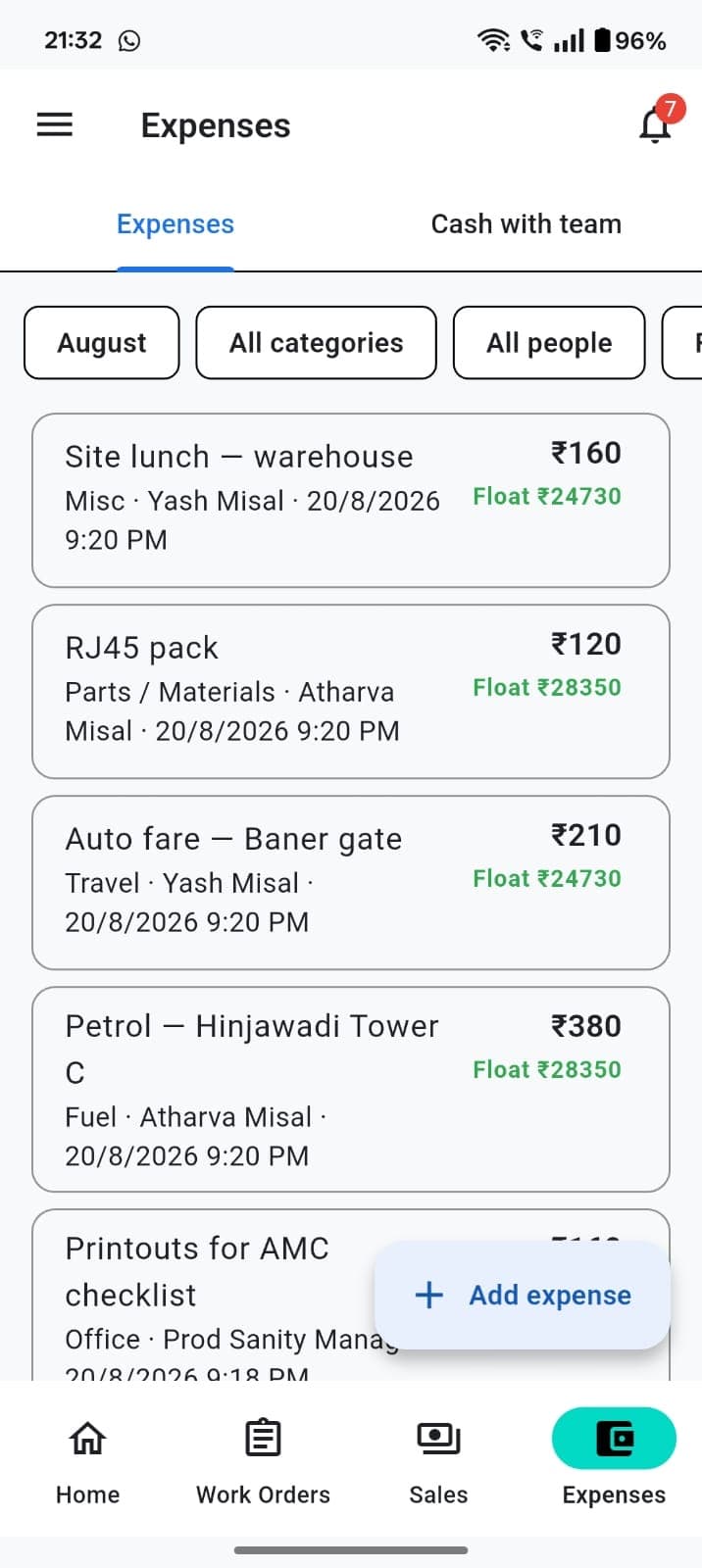
In TeamShastra staff open Expenses and add the amount, the date and a category: fuel, parts, travel, tools, office, miscellaneous or a custom category you create. They attach a photo or file of the receipt.
Each expense says how it was paid: from the cash the person is holding for the company, or from a bank account. The owner sees pending expenses and approves or rejects them. A rejected expense is reversed, so the cash balance goes back to what it was.
Approved expenses show up in the expense report by person and category. Maybe one team spends more on fuel than another, or parts bought locally cost more than expected. You'll spot it and act.
Expenses can be logged even without network and synced later, so a technician on a rooftop or in a basement does not have to remember to do it in the evening. The receipt photo is attached at the time of spending, when the bill is still in hand.
For a wider view, see the field expense software overview.
How it works in the app
- Set up expense categories, or use the built-in ones.
- The technician opens Expenses and taps to add a new one.
- They enter the amount, choose a category and attach the receipt photo.
- They choose whether it was paid from staff cash or a bank account.
- The owner reviews pending expenses and approves or rejects each one.
- Check the expenses report at month end by person and category.
Who it is for
Technicians log expenses; owners approve them and read the reports. It fits teams that travel a lot or buy parts on the spot: pest control crews, appliance repair technicians, solar installation teams and lift maintenance staff.
Benefits
- Every claim has a receipt photo attached
- Owners approve each spend instead of paying a weekly lump sum
- Rejected claims are reversed in the cash balance automatically
- Reports show where money goes by person and category
- Staff stop paying out of pocket and waiting for weeks
What it does not do
- Reimbursement isn't automatic. You still pay the person.
- Amounts aren't read from receipt photos; the technician types them.
Questions about field expenses
Straight answers about field expenses in TeamShastra.
Can technicians add expenses from their phone?
Yes. Technicians can open Expenses in the Android app, add the amount and category, and take a photo of the bill. If they are offline at the time, the entry is saved and synced later. The owner then sees it waiting for approval.
What happens when I reject an expense?
The expense is marked rejected and its effect is reversed. If it was paid from a person's staff cash, that cash balance goes back up by the same amount. This stops wrong claims from quietly lowering the cash the person is holding.
Can I add my own expense categories?
Yes. Besides fuel, parts, travel, tools, office and miscellaneous, owners can create categories that fit the business, such as chemical refill, ladder hire or parking. Reports group spending by these categories. Clear categories make month-end review much quicker and show where small spends add up.
Is a receipt photo required?
Staff can attach a photo or a file for each expense, and most owners ask for it. A clear photo of the bill is the easiest way to check an amount later. For small items without a bill, ask staff to write a short note.
How is this different from staff cash?
Staff cash is the money you hand to a person to spend for the company. Expenses are what they spend it on. When an expense is paid from staff cash, the person's cash balance goes down. Together they show money given, money spent and money still with the person.
Keep exploring
Plans and prices are on the pricing page.