Staff roles and permissions for owner, manager and technician
Your new helper needs a customer's address, not your profit on every job. Staff roles and permissions in TeamShastra decide who sees and changes what. Owners see everything, including money and salary, technicians see their own work, and managers sit in between.
The problem
Shared logins are common in small firms. Everyone uses the owner's phone number to open the billing software. Your helper only needed an address, yet they can also see every customer's dues, every supplier rate and the profit on each job.
When someone leaves, they still know the password. Data walks out with them. Salary figures, which should be private, become gossip in the team.
On the other side, a manager who needs to assign jobs cannot do it without asking the owner, because the tool has only one level of access.
Owners also end up doing everything themselves. Without separate logins, they cannot hand over job assignment or attendance to a trusted supervisor. Every small change still comes to their phone, even when they are travelling or with family.
How staff roles and permissions are split
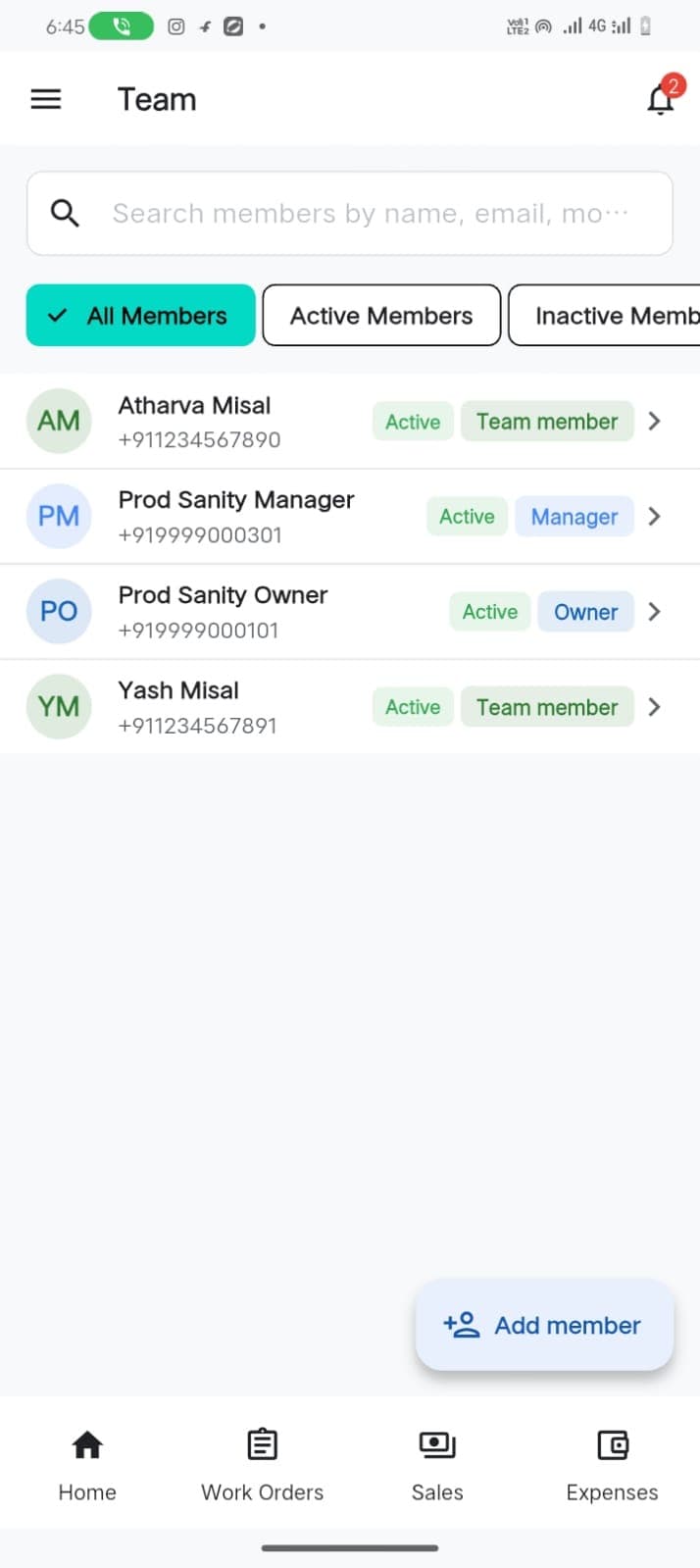
TeamShastra has clear roles. The owner controls the company, settings, staff salary and every report. A manager runs day-to-day work: creating and assigning jobs, reviewing attendance and leave, and, when the sales module is on, handling bills and purchases. A technician sees jobs assigned to them, their own attendance, their own expenses, their own payslips and their own performance.
There is also a customer role for the optional portal. A customer user can only see the jobs you share with them and the photos and comments you mark as visible.
You invite people by phone number, and each person logs in with their own account. If someone leaves, deactivate them and their access stops. Members can upload documents such as ID proof on their profile for the owner to approve, so papers are in one place when needed.
Because every person has their own login, the activity timeline on each job shows exactly who made each change.
How it works in the app
- Open Team and tap to add a new member.
- Enter their name and phone number and choose owner, manager or technician.
- The person installs the app and logs in with their own number.
- Ask the member to upload ID documents on their profile, then approve them.
- When someone leaves, open their profile and deactivate them.
Who it is for
Owners use roles to keep money and salary private. Managers get enough access to run the day without calling the owner for every small change. Technicians get a clean app that shows only their work. It matters most for growing firms such as IT AMC providers, fire safety companies, lift maintenance firms and home automation installers.
Benefits
- Salary, profit and supplier rates stay with the owner
- Managers can run the daily plan on their own
- Each person has their own login, so actions are traceable
- Leavers lose access the moment they are deactivated
- Customers can be given a narrow view of their own jobs
What it does not do
- Roles are fixed sets; you cannot design a custom role screen by screen.
- Owners can turn whole modules off for the company, but not hide one module from one person only.
Questions about roles & permissions
Straight answers about roles & permissions in TeamShastra.
Can a technician see the company's bills and income?
No. Technicians see jobs assigned to them, their own attendance and leave, the expenses they logged, their own paid payslips and their own performance. Sales, purchases, team lists and company reports are not part of the technician role, so bills and income stay out of view.
What can a manager do that a technician cannot?
Managers can create jobs, assign and reassign them, see the whole team on the Today board, review attendance and mark leave or absence. If the sales module is on, they can also work on quotations, invoices and purchases. Staff salary and company settings stay with the owner only.
Can a manager see staff salary?
No. Staff salary is an owner-only area. Managers can review attendance and leave, which feed into pay, but they cannot open salary runs, set wages or see payslips of other people. This keeps pay private even when a manager handles the daily team.
What happens to a job when I deactivate a technician?
Their past jobs, photos and comments stay in the company records with their name. They simply cannot log in anymore. Reassign any open jobs to another person so the work continues without a gap. If they rejoin later, reactivate them and their old records are still there.
Can I keep ID proof of staff in the app?
Yes. Each member can upload documents such as an Aadhaar copy or a joining letter on their own profile, and the owner approves them. This keeps important papers in one place instead of a drawer or a personal phone, and you know which staff still have papers pending.
Keep exploring
Plans and prices are on the pricing page.