From site visit to approved quote with a quotation and estimate app
Quote while you're still at the site, before the customer calls the next vendor. TeamShastra works as a quotation and estimate app for service work. Build the quote from your catalog, share it as a PDF, and turn it into a job or a GST invoice once they say yes.
The problem
A site survey ends with the customer asking, "Send me the rate." The technician tells the owner. The owner types a quotation in Word, saves it with a random name and sends it in the evening. If the customer says yes a week later, the owner has to search for that file.
Then the same items and prices are typed again into a bill. Rates get changed by mistake. The customer points out that the invoice does not match the quote, and the payment waits until it is fixed.
Worst of all, quotes that were never answered are forgotten. Nobody calls back, so orders that were almost won go to a rival.
There is also no single place to see every quote sent this month and its total value.
Why a quotation and estimate app saves typing
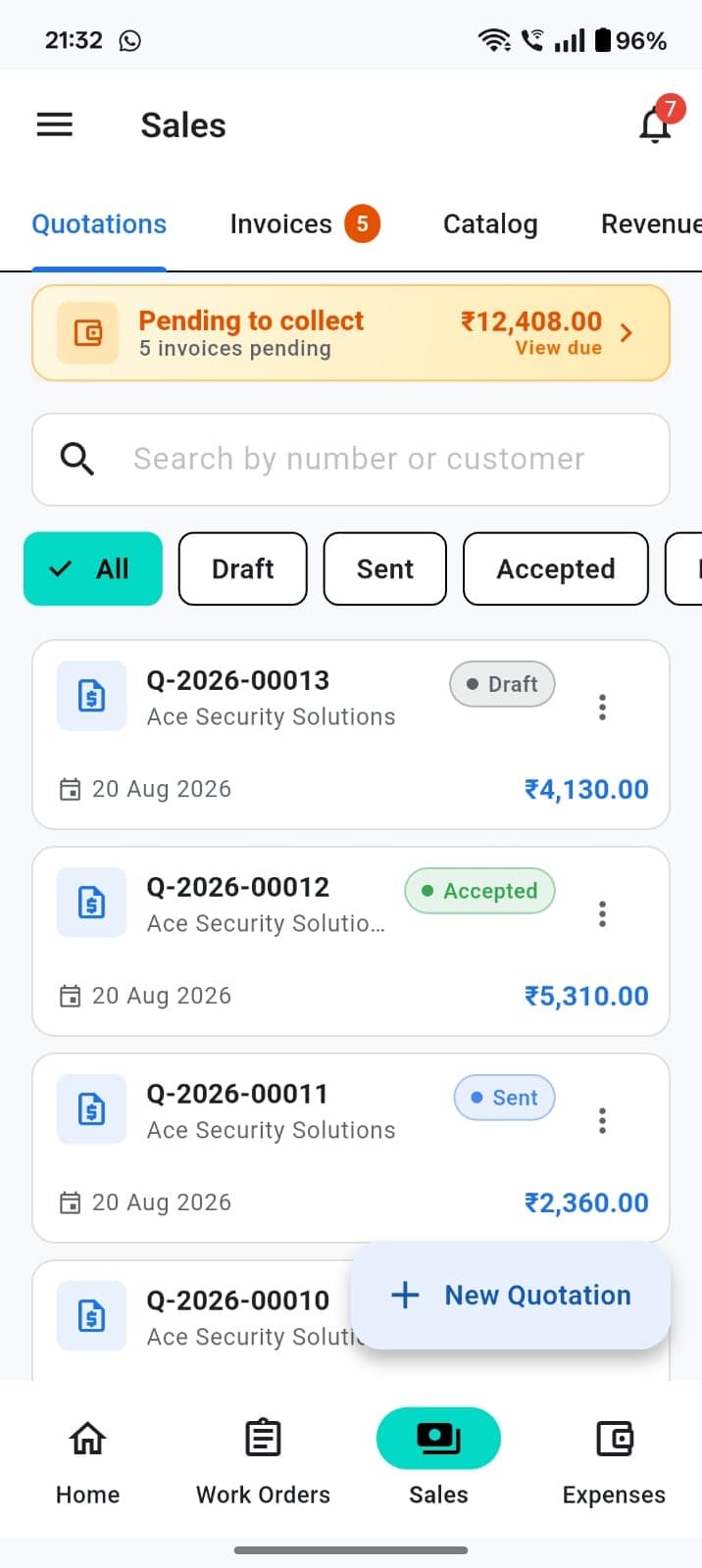
In TeamShastra a quotation is a proper document in the Sales section. Pick the customer, add items from your catalog with prices and tax, and add terms. The PDF is ready to share on WhatsApp in a moment.
Quotations stay in a list with their status, so you can see which ones are waiting. Call the customer from the quote screen to follow up.
Got a yes? Convert the quotation. Make it a job, and the work order is created for the same customer with the quote attached. Or make it an invoice, and every line, price and tax moves across. The invoice stays editable if something changed on site. The original quote is locked, so you always know what was first promised. With a UPI ID saved, a quote can also carry a scan-to-pay QR for advance payments.
Each quotation keeps its own number series, set in your GST settings, so references stay clean when customers quote them back to you.
How it works in the app
- Open Sales and create a new quotation for the customer.
- Add items from the catalog; edit price, quantity or discount if needed.
- Add terms such as validity and payment conditions, then save.
- Share the quotation PDF on WhatsApp.
- When approved, convert it to a job, to an invoice, or to both.
Who it is for
Whoever prices the work in your company will use it most. It helps any trade where a site visit comes before the order: CCTV installers, home automation installers, fire safety suppliers, lift maintenance firms and solar installers.
Benefits
- Quotes look professional and carry your logo and terms
- Approved quotes become jobs or invoices without retyping
- The first price promised is locked for reference
- Open quotes are easy to follow up from one list
- Advance payments can be collected through the UPI QR
What it does not do
- Follow-ups on pending quotes are yours to make; no automatic reminders go out.
- There is no online page where the customer clicks to accept; approval comes by phone or message.
Questions about quotations & estimates
Straight answers about quotations & estimates in TeamShastra.
Can I convert a quotation into a job?
Yes. Open the approved quotation and choose to make a job. TeamShastra creates a work order for the same customer and links the quote to it. When the technician finishes, the job collection can use the quote total, which makes cash or UPI collection simpler.
What happens to the quotation after I turn it into an invoice?
The quotation is locked so its original lines and prices stay as they were sent. The new invoice copies everything and stays editable. If the customer asked for an extra camera or a longer cable on site, change the invoice, not the quote.
Can I send a quote without GST?
Yes. Tax on each line comes from the item's rate in your catalog, and items can have a zero rate. Businesses that are not registered under GST can keep tax off. Registered businesses usually show GST on the quote so the final bill matches.
Is an estimate different from a quotation in the app?
In TeamShastra they are the same document. Many customers say estimate and others say quotation. If you are moving from Vyapar, estimates you made there can be imported as quotations so your old records are not lost. Use whichever word your customers prefer.
Can I follow up on a pending quote from the app?
Yes. Open the quotation and use the call or WhatsApp button to reach the customer. The list of quotations shows what is still pending, so you can go through it once a week and call back customers who have not decided yet.
Keep exploring
Plans and prices are on the pricing page.