A technician dispatch board for planning today's work
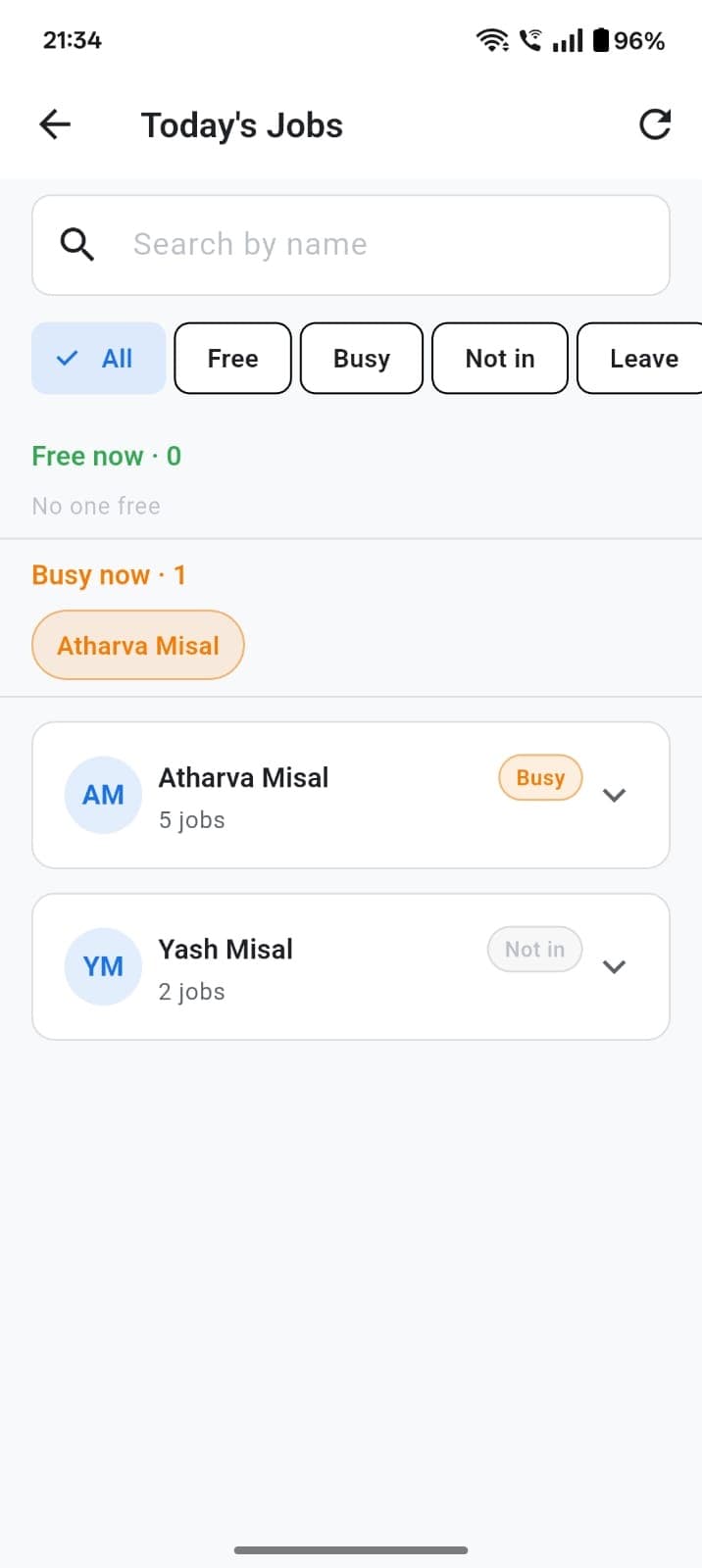
It's 9:40, three calls are waiting and you can't tell who has reached their first site. TeamShastra's Today board is a technician dispatch board for exactly that morning rush. It shows who's free, busy, not in yet or on leave, and which jobs are still waiting, so you assign from facts instead of guesses.
The problem
At 9:30 every morning the owner starts dialling. Who has reached the office? Who is still at yesterday's site? Who said he would come late because of a family function? Each call takes two minutes, and with eight technicians the first hour is gone.
Meanwhile new complaints keep coming in. Without a clear picture, the owner gives the urgent job to the person who picks up the phone first, not the person who is actually nearest or free. One technician gets three jobs while another waits in the shop drinking tea.
Late in the afternoon the same confusion repeats. Nobody is sure which morning jobs are finished, so the evening plan is made on memory too.
Customers feel this too. They are promised a visit before noon and get a call at four saying the technician is still busy elsewhere.
How the technician dispatch board shows your day
TeamShastra builds the board from data your team already enters. When a technician checks in, they show as available. When they start a job, they move to busy. People who have not checked in show as not in, and anyone with approved leave shows as on leave for the day.
Next to the people, the board lists today's jobs in columns such as not started and in progress. A manager can open any waiting job and assign it to someone who is free. The technician gets a push notification on their phone right away.
Because the board reads live job statuses, the afternoon check is quick. Finished jobs drop out of the in-progress column. Jobs on hold stay visible with their comments. You know where the day stands without calling anyone, and you can plan tomorrow from the same screen.
Because the board is built on real actions, it stays honest even on the busiest day of the season.
How it works in the app
- Ask every technician to check in when they start work, from the Home screen.
- Open the Today board to see who is free, busy, not in or on leave.
- Look at the not started column for jobs that still need someone.
- Open a waiting job and assign it to a free person; they get an alert.
- Check the board again after lunch to see what moved to in progress or completed.
Who it is for
This page is for owners and managers who hand out work each day. Technicians do not need to do anything extra; their check-in and job updates feed the board. It works well for appliance repair teams, RO service shops, pest control crews and cleaning companies with many short visits.
Benefits
- The morning round of phone calls is replaced by one screen
- Urgent jobs go to someone who is actually free
- Leave and late arrivals are visible before you plan
- Waiting jobs are easy to spot, so none are left without an owner
- The same view helps plan the next morning
What it does not do
- Jobs aren't assigned automatically. A manager looks at the board and decides.
- Free and busy come from check-ins and job starts, not from following phones on a map.
Questions about technician dispatch & today board
Straight answers about technician dispatch & today board in TeamShastra.
How does the board know a technician is free?
Anyone who has checked in and isn't working on a started job shows as free. When they tap Start on a job, they become busy. This depends on your team using check-in and job start honestly, which is why many owners make check-in part of the daily routine.
Does the dispatch board show people on leave?
Yes. If a leave, half day or holiday has been marked or approved for someone, the board shows them as on leave for that day. That shows up before you assign, so you don't send work to someone who isn't coming.
Can managers assign jobs from the Today board?
Yes. Managers and owners can open a job from the board and assign it to one or more people. The assigned technician receives a push notification and finds the job in their own list. Technicians themselves cannot reassign other people's work.
Is this the same as a map of where my staff are?
No. The board is a list of people and jobs by status. TeamShastra also has a separate team map that shows pins from check-ins, job starts and job photos. Neither feature follows a phone through the day; they only use moments when the person takes an action.
Can I see yesterday's board?
The board is built for today. For earlier days, use the work orders list with a date filter, the attendance history and the job summary report. Together they show who worked, which jobs were completed and which were left open.
Keep exploring
Plans and prices are on the pricing page.